Monday.com
monday CRM Singapore — Enterprise Sales Pipelines & Account Management
monday CRM Singapore — Enterprise Sales Pipelines & Account Management
Couldn't load pickup availability
monday CRM in Singapore, configured by a certified monday.com partner in Singapore for enterprise sales teams managing long cycles, multiple stakeholders, and accounts that span years.
- Pipelines built for long enterprise cycles — multi-stage, multi-stakeholder deals with the fields your team will maintain
- Account and contact management — full relationship history on one record, surviving rep turnover
- Deal tracking and forecasting — weighted pipeline views leadership can rely on without a manual weekly scrub
- Sales automation — stage-change alerts, follow-up reminders, and approval routing that runs without chasing
- Quote-to-invoice connection — closed deals flow into billing on the same platform
- Migration from your existing CRM — contacts, deal history, and notes brought across, mapped and deduplicated
Built for Enterprise Sales Pipelines, Not Spreadsheets
Enterprise selling breaks most CRMs. A deal with six stakeholders, three rounds of procurement, and a nine-month cycle does not fit a tool designed for transactional sales. Reps stop logging activity, forecasts drift from reality, and leadership makes decisions on a pipeline nobody trusts.
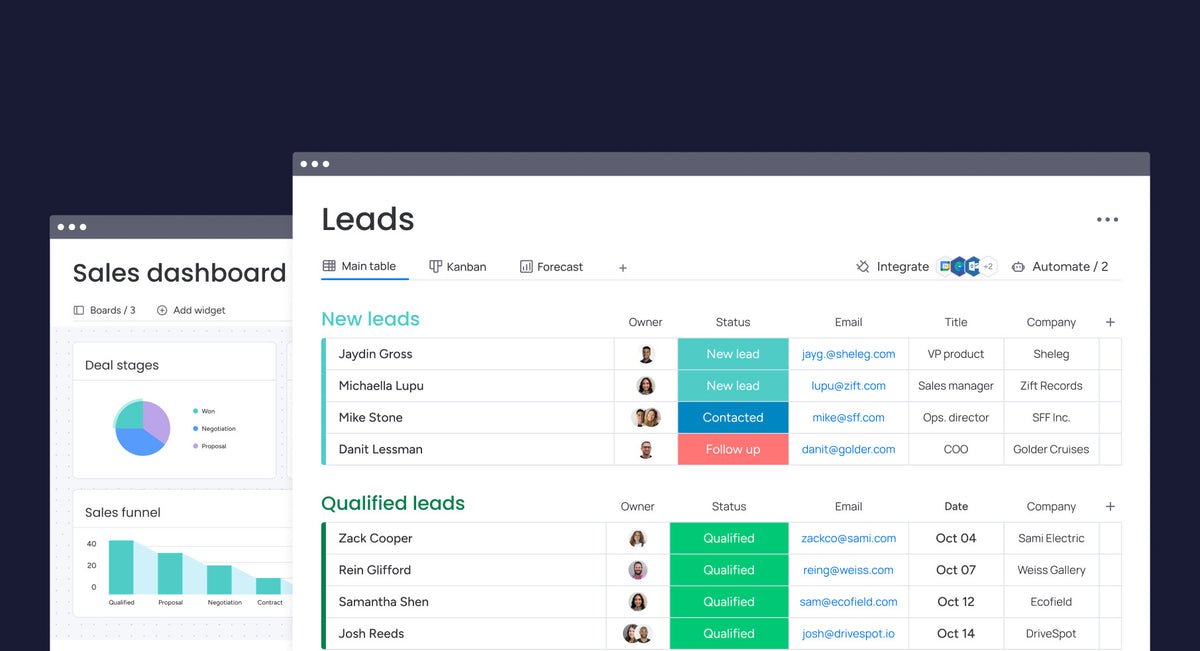
monday CRM is flexible enough to model how your deals genuinely progress - the stages you actually use, the fields your team will actually fill in, and the approvals your finance team needs before a quote goes out. We configure it around your sales process rather than asking your reps to adopt someone else's.
The test we apply to every field: will a rep fill this in on a Friday afternoon? If the answer is no, it either gets automated or it comes out. A CRM with twelve reliable fields beats one with forty that are half empty.
Account and Contact Management in One Place
Account and contact records sit alongside deals, so account managers see the full history in one view: every conversation, quote, renewal, and open issue. When a rep leaves, the account context stays with the account rather than in their inbox.
For enterprise accounts this matters more than it sounds. A single client may run several deals at once across different business units, with overlapping stakeholders and different decision timelines. Flattening that into one deal record loses the picture; keeping them separate without a parent account loses it too. We structure accounts so both views work - the individual deal and the total relationship.
Contact records hold role, influence, and last-touched date, which is what makes stakeholder gaps visible before they cost you a deal.
Deal Tracking, Forecasting, and Sales Automation
Forecasting only works if the underlying data is current, so most of the automation we build exists to keep it that way without nagging. Stage changes trigger alerts to the people who need to act. Deals untouched past a threshold surface on a review board. Follow-up tasks generate themselves when a stage advances rather than relying on the rep to remember.
On top of that, weighted pipeline views give leadership a forecast they can read directly instead of commissioning a weekly scrub - probability by stage, expected close dates, and movement since last period, all pulled from live records.
Approval routing sits in the same flow. Discount thresholds and non-standard terms go to the right approver automatically, with the decision logged on the deal.
Connecting CRM to Quotes and Invoicing
Because billing lives on the same platform, a closed deal becomes a sent invoice without anyone re-typing line items. The quote is generated from deal data, approved through your finance process, and converted to an invoice carrying the same values it held all along.
That removes the most common source of billing errors, which is not carelessness but re-entry - someone rebuilding a quote in a second system and transposing a quantity or dropping a discount. It also compresses the delay between a client saying yes and receiving something to pay.
See the quote-to-invoice setup for how that flow is built, including approval steps and overdue chasing.
Migrating from Your Existing CRM
Migration is where CRM projects usually go wrong, so we treat it as its own phase rather than a data-loading step at the end. Contacts, accounts, deal history, and notes come across mapped to the new structure - not dumped into custom fields nobody looks at again.
Before anything loads, we deduplicate. Most CRMs that have run for a few years hold the same company under three spellings and the same person at two email addresses. Carrying that forward guarantees your new pipeline reports are wrong on day one.
We also agree what does not migrate. Deals closed years ago, contacts who have left, and fields nobody has used since 2022 are better archived than imported.
FAQs
Q: What is the difference between monday CRM and monday CRM Enterprise?
A: Enterprise plans add advanced permissions, governance, security, and scale features on top of the core CRM capabilities.
Q: Can monday CRM Enterprise integrate with my existing tools?
A: Yes. monday supports native integrations and APIs so we can connect to email, calendars, and other core business systems as needed.
Share